how-to
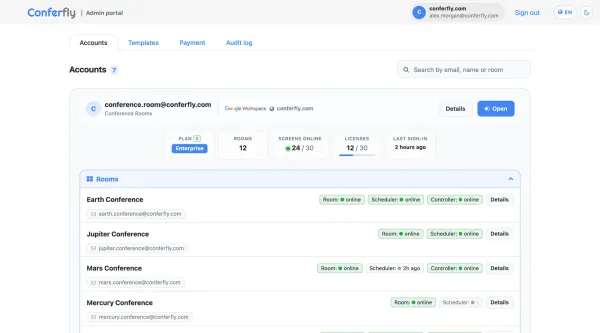
Conferfly Admin Portal
Manage every Conferfly account and room in your organization from one place: live room status, licenses, room templates and a full audit log.

how-to
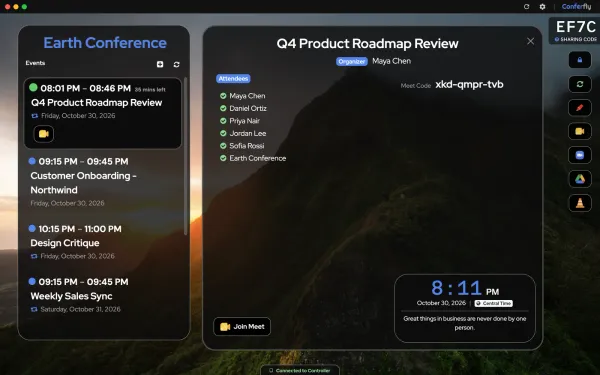
Run Conferfly on your room computers: auto-join on every platform, room audio and video, kiosk mode, auto-login and a daily reset, on Windows, macOS and Linux.

kiosk
For a seamless and reliable conference room experience in kiosk mode with Conferfly, follow these steps: Start with the Conferfly app. On Windows, Mac and Linux, the Conferfly app handles most of this for you. In Settings > App Settings, turn on Kiosk Mode, Start on Login, Keep PC Awake
how-to
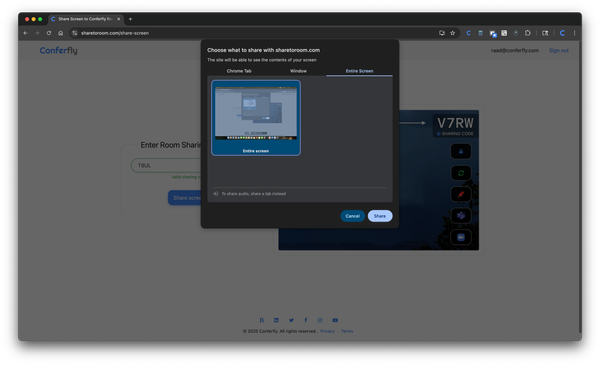
Conferfly’s screen sharing feature offers a seamless way to share your local laptop screen directly to a Conferfly room, utilizing WebRTC technology. This entails encrypted peer-to-peer Real-Time Communication (RTC) between your computer and the Conferfly room, making it faster than traditional screen sharing as the traffic
For a seamless and reliable conference room experience in kiosk mode with Conferfly, follow these steps: Start with the Conferfly app. On Windows, Mac and Linux, the Conferfly app handles most of this for you. In Settings > App Settings, turn on Kiosk Mode, Start on Login, Keep PC Awake
Conferfly is a tool for conference rooms that allows you to join any call with just one click/tap. We aim to make the conference room experience as frictionless as possible. Step 1: Book a conference room: To book a conference room and view your booking in the Conferfly app
Conferfly is a tool for conference rooms that allows you to join any call with just one click/tap. We aim to make the conference room experience as frictionless as possible. Step 1: Book a conference room: To book a conference room and view your booking in the Conferfly app

This guide is for IT staff setting up Conferfly in conference rooms. For user instructions on how to use Conferfly, please click here for Microsoft 365 and here for Google Workspace. Conferfly is a tool for conference rooms that lets you join any call with just one click or tap.

Conferfly now supports mapping external input devices directly to meeting actions. This feature (available on Enterprise plan) allows you to trigger meeting controls with a single button press on a connected device like a speaker mic with built-in buttons. Supported devices include USB-connected speaker phones and meeting peripherals

Note: This guide is for macOS. For the Windows guide, click here. Introduction: Set up your Mac so Conferfly opens full screen in Kiosk Mode every time it starts, with no one needing to touch it after a reboot. There are two ways to do this. We recommend the Conferfly

Note: Admin access is required for the steps below. Please share this article with your Google Workspace admin to grant the Conferfly account the needed permissions. Login to Google Workspace Admin, then follow the instructions shown in the images below. After completing the steps above, you should be able to

Note: Admin access is required for the steps below. Please share this article with your Google Workspace admin to grant Conferfly account write access to the conference room calendar. To grant the Conferfly account read/write access to the conference room calendar, log in to Google Calendar with an admin

Note: The steps below require administrative access. Please forward this article to your Microsoft 365 admin to grant Conferfly account write access to the conference room calendar. To grant the Conferfly account write access to the conference room calendar, log in to Outlook with the conference room resource account. Then,
Conferfly is a tool for conference rooms that allows you to join any call with just one click/tap. We aim to make the conference room experience as frictionless as possible. Step 1: Book a conference room: To book a conference room and view your booking in the Conferfly app
Conferfly is a tool for conference rooms that allows you to join any call with just one click/tap. We aim to make the conference room experience as frictionless as possible. Step 1: Book a conference room: To book a conference room and view your booking in the Conferfly app
This guide is for IT staff setting up Conferfly in conference rooms. For user instructions on how to use Conferfly, please click here for Microsoft 365 and here for Google Workspace. Conferfly is a tool for conference rooms that lets you join any call with just one click or tap.
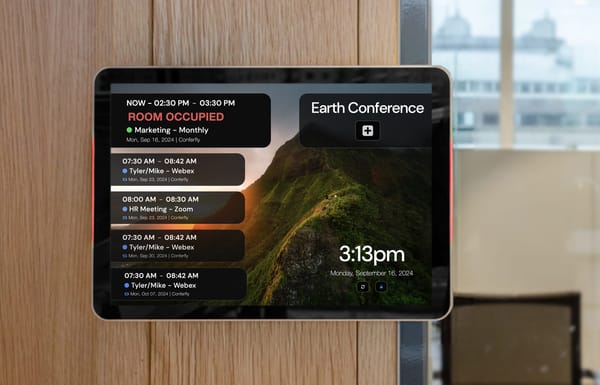
Conferfly [Scheduler] is designed for tablets to be mounted on the wall outside conference rooms. It allows users to check the real-time availability of conference rooms, book meetings, view upcoming meetings, and see their durations at a glance. This tool eliminates the need to enter a room to see

With the Conferfly tablet controller, you can join calls automatically with one tap from the controller. The tablet controller will connect to the room automatically once it’s open on another PC, and you can tap on the meeting, and the action will reflect in real-time on the room.

Introduction: Set up your Linux conference room computer so Conferfly opens full screen in Kiosk Mode every time it starts, with no one needing to touch it after a reboot. There are two ways to do this. We recommend the Conferfly app: it has kiosk mode and launch at startup

Note: This guide is for ChromeOS devices managed through Google Admin. Setting up a room on Windows, Mac or Linux? The Conferfly app is much simpler: turn on Kiosk Mode and Start on Login, and you're done. No admin console or license needed. See the Windows, Mac or